
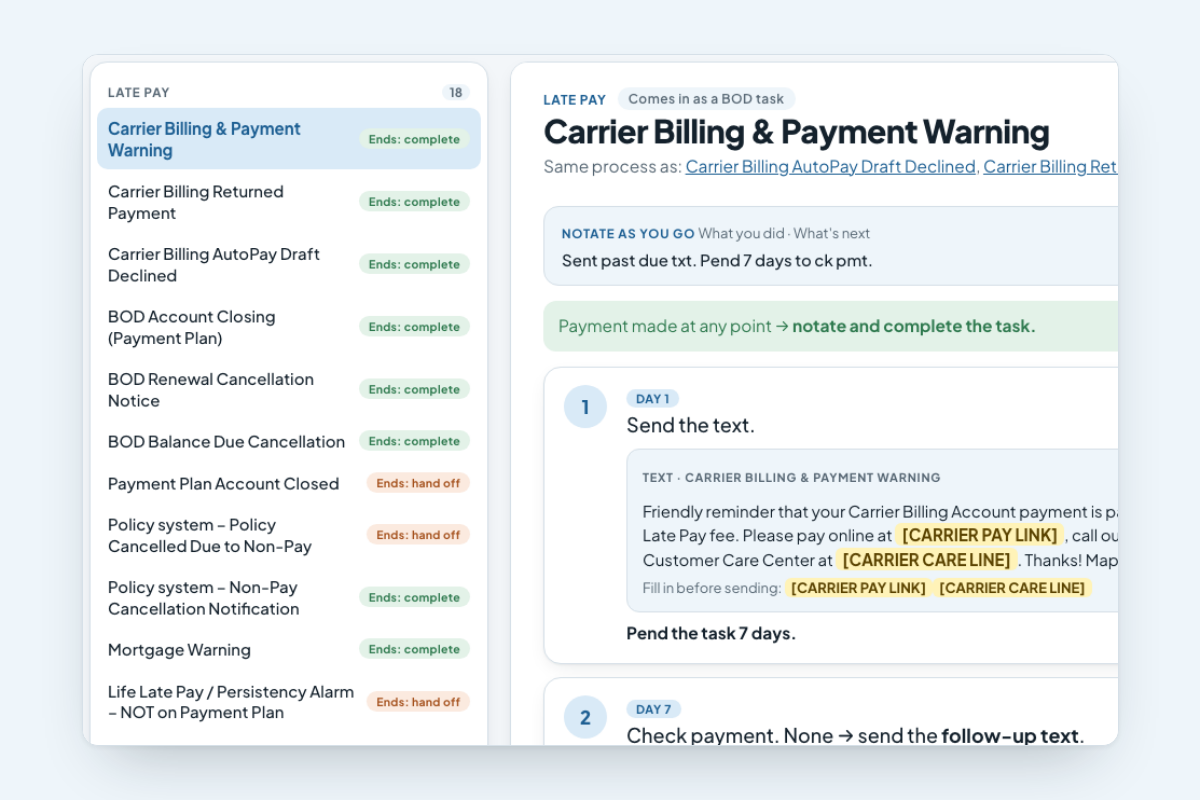
Every task, step by step
Each beginning-of-day task, with numbered steps and the timing for each one.
Thinks Three turns your office's process into a Thinkbook. Your team types the task's name and it comes up: the steps, the text or email to send, how to notate it, and who in your office it goes to. No scrolling, no flipping pages, no guessing from notes.
Built inside a working insurance agency. For captive and independent offices.

When a new team member gets a task they haven't seen before, where do they go to figure out what to do?
If it's a binder or a stack of PDFs, hunting through it takes so long that they stop looking and just ask. Now two people have stopped what they were doing. If nothing is written down, they work from their own notes, steps get missed, and every question comes back to you or your office manager.
Example: a typical office before a Thinkbook.
Last opened in spring.
Three versions on three desks.
Two people have left since.
"Ask her, she knows."
Printed, and out of date.
Somewhere on the drive.
"A binder is like a phone book. A Thinkbook is like a search bar. Both have the number, but only one gets you there in seconds."
Sarah Wannemacher, founderThree steps, on the office computer or a phone.
Your team types the task's name or pastes the email subject from your CRM. Search forgives typos and short names, on the office computer or a phone.
Day 1, Day 7, the day before cancellation. The text or email is right there in your office's voice, one click to copy, with the note format your team uses.
Every hand-off has a real name on it. Billing goes to your billing person, win backs to your producer. Nobody has to remember who gets what.
Generic template libraries are built for every office. A Thinkbook is built for yours. Generic tools tell your team what an office does. A Thinkbook tells them what your office does.
"A template library is a suit off the rack. It mostly fits, but your team spends time taking in the waist on every task. A Thinkbook is tailored. It fits the day you put it on."Sarah Wannemacher, founder
Every hand-off has a name. When someone joins, leaves, or is out for the day, the Thinkbook shows who covers it.
Texts you love go right in. No templates? Sarah writes them in your office's voice, signed off the way you sign off.
Real screens from the app. Sample office, no customer data.
Each beginning-of-day task, with numbered steps and the timing for each one.
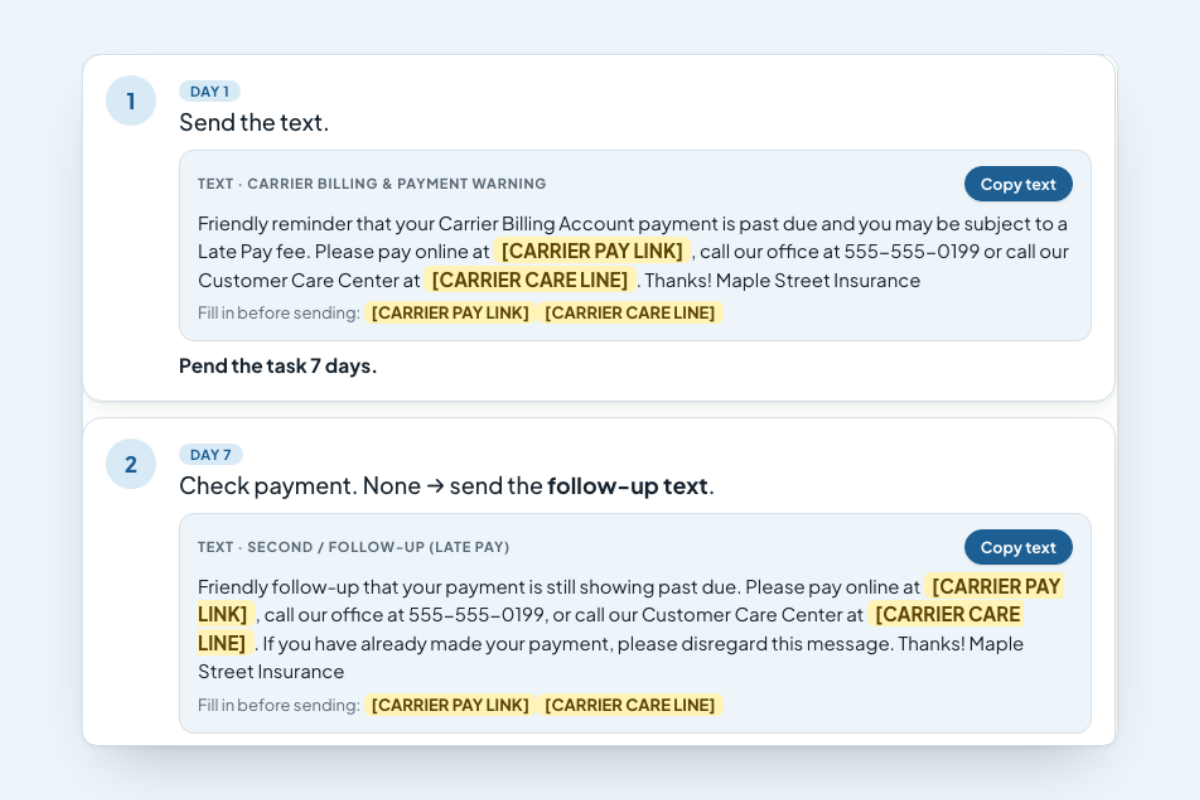
Your office's own templates. The parts to fill in are highlighted, then one click to copy.
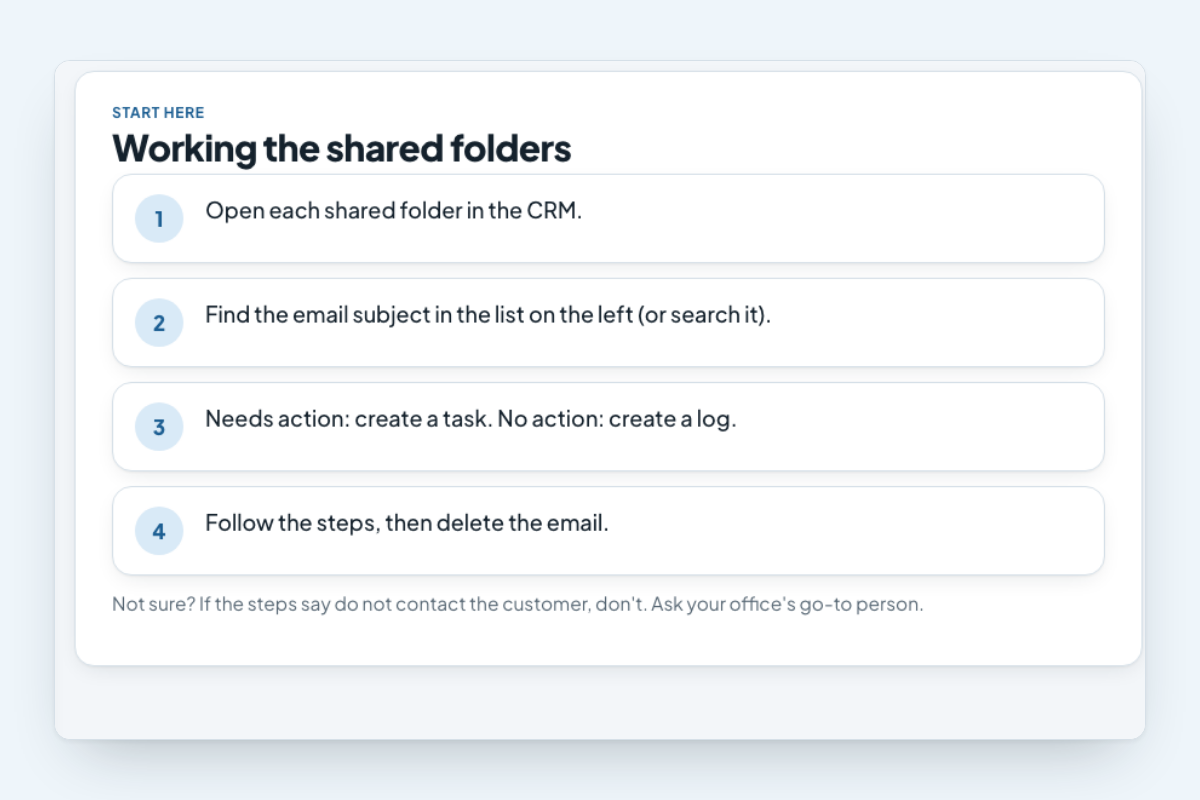
Find the email subject, see whether it needs a task or a log, and follow the steps.
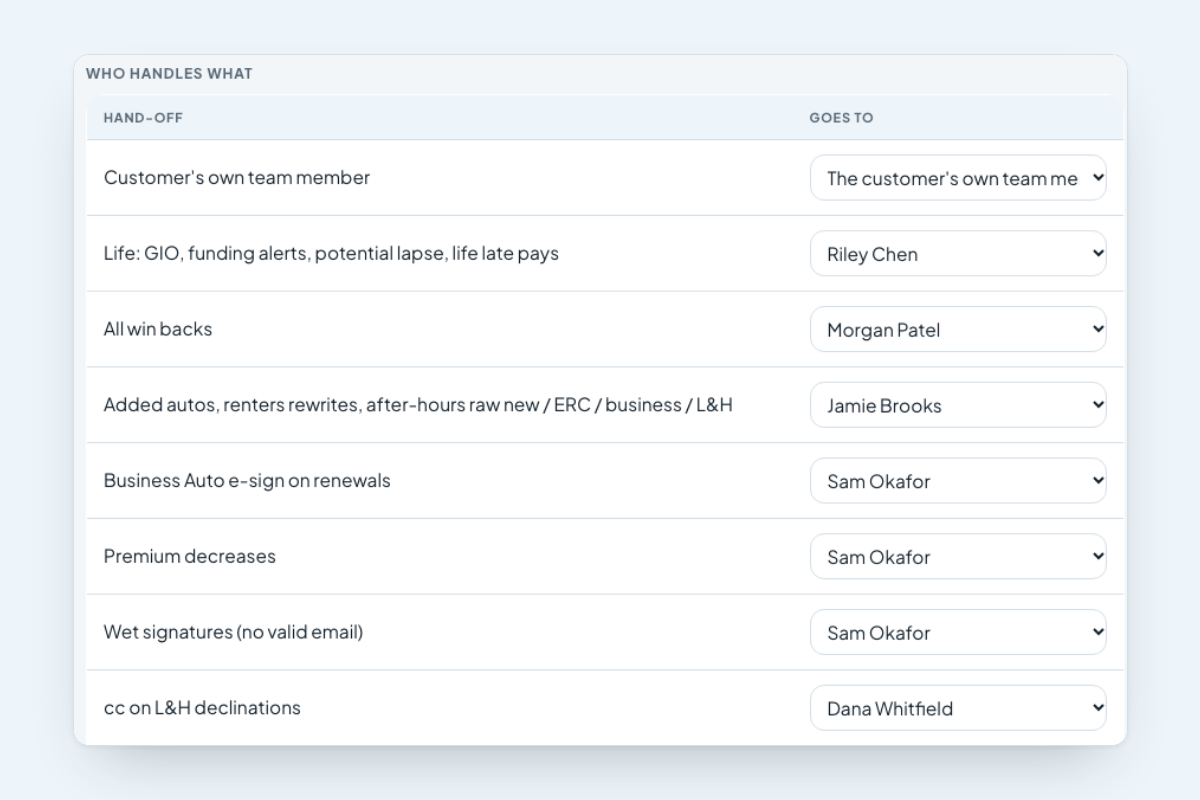
Set it once for your office and every task follows it. The "who's out" switch shows who covers today.
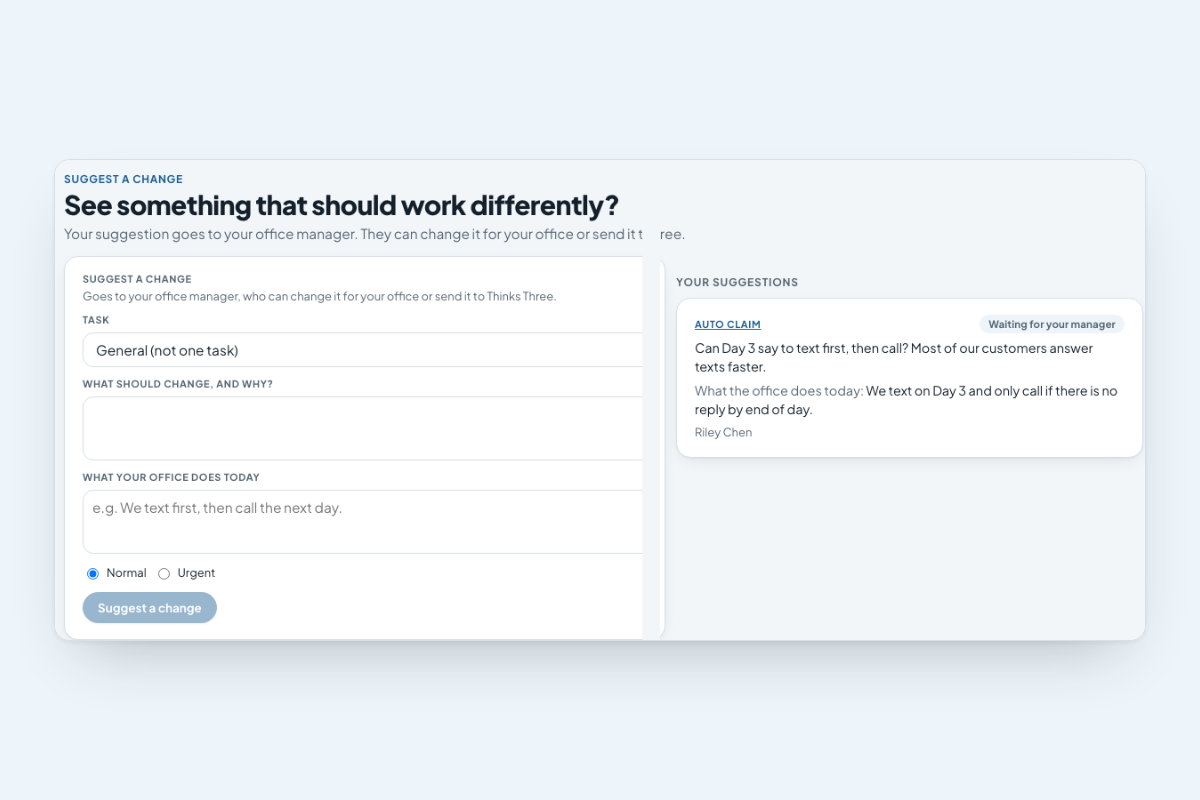
Anyone can suggest a better way, right from the task. Your manager decides what changes.
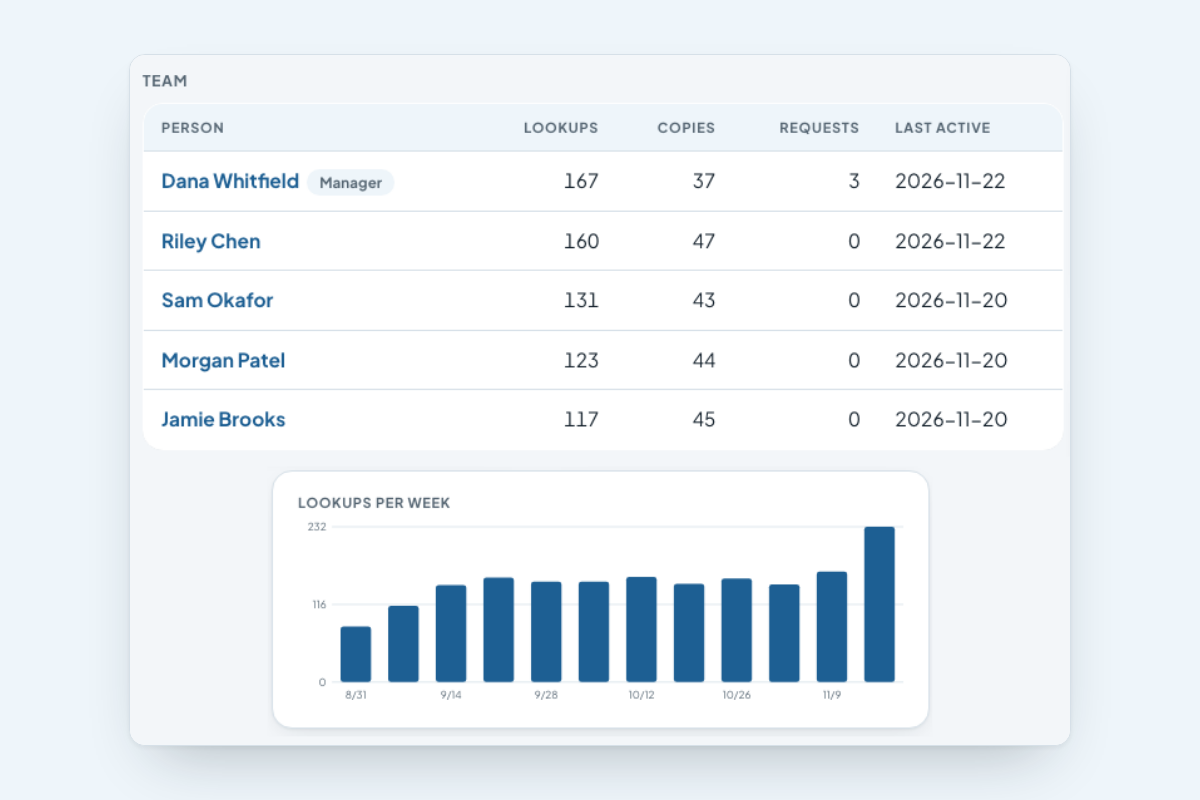
The owner sees lookups and copies by week. Counts only: no customer data, no search text.
Estimates, not measurements. Working numbers from Sarah's own office experience. A new hire saves about 5 hours a week on top of this. Your office's own counts will show yours.
"It's like a pit crew. A few seconds saved at each stop doesn't feel like much until you add up the whole race. And your pit crew knows your car."
Start the office with the steps already written, so your first hires have the answers from their first morning.
The know-how built over years lives in a few heads. Write it down once, keep it current, and let the team carry service while you sell.
Every morning, my dad told my sister and me the same three things: work hard, pay attention, be a good person. Whatever went wrong, a bad test or a fight with a friend, it always fell into one of those three buckets.
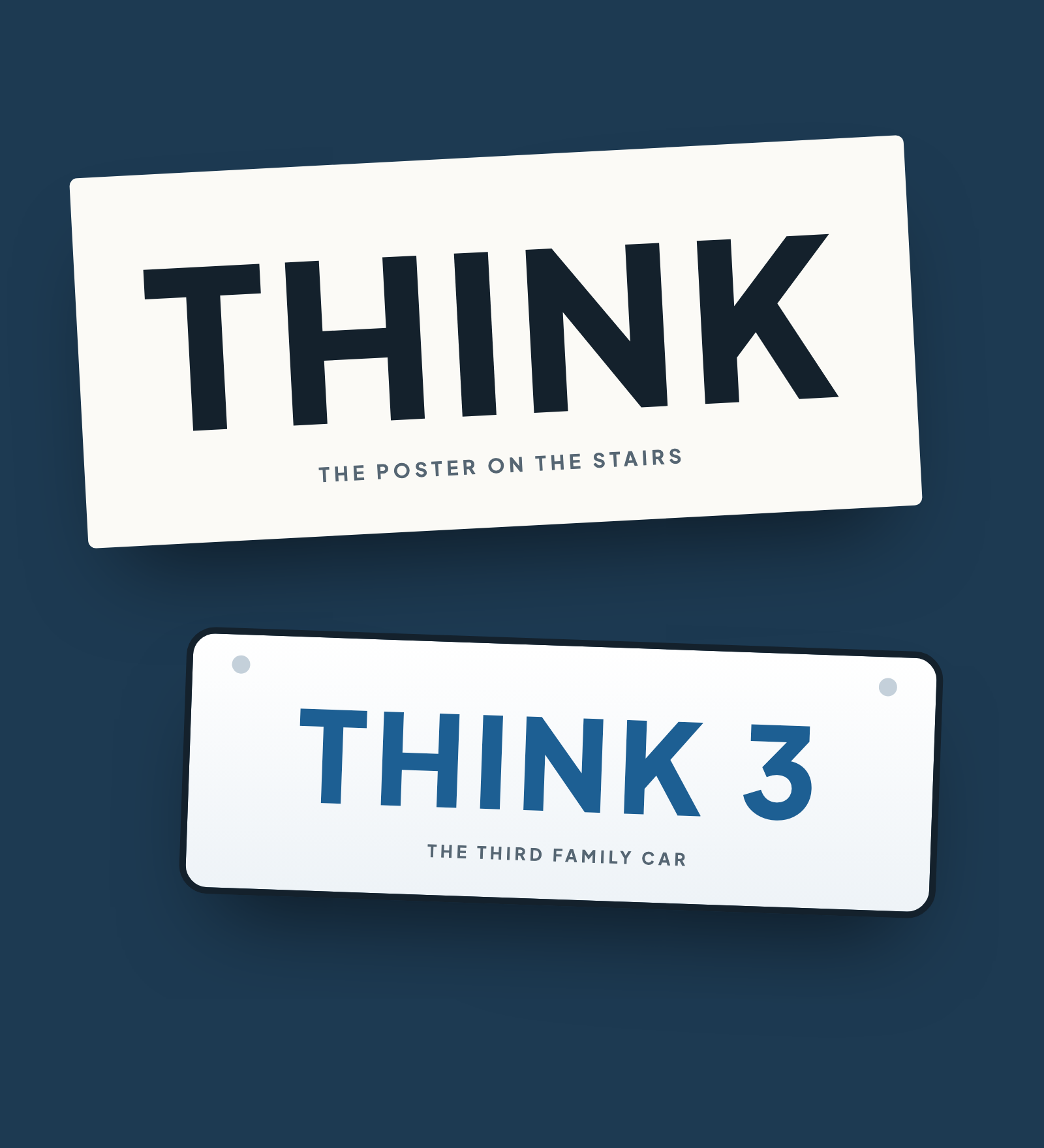
There was a huge THINK poster on the stairs coming down from our rooms. "We've raised you to do these three things," he'd say, "so all you have to do is think." When my sister got her first car, the plates said THINK 3.
Now I say it to my son every morning. When I left my agency to start my own business, I asked what values I'd grown up with my whole life. The name was already there.
Work hard. Pay attention. Be a good person.

Founder, Thinks Three, LLC
Sarah wrote the playbook her own agency office runs on every morning: every task, with its steps, timing, texts and hand-off. Now she builds a Thinkbook for other offices, written for the way each one works, and keeps it current as things change.
Sarah to confirm Years in agency work and role.
Your office's playbook in one place. Type a task's name and see the steps, the timing, the text or email to send, how to notate it, and who handles it next. The task itself stays in your own CRM. It works for captive and independent offices, in a web browser on the office computer or a phone.
Yes. Right now your process is like a family recipe nobody wrote down: everyone makes it a little differently. The Thinkbook writes it down once, so it comes out the same no matter who makes it.
You don't have to. Generic template libraries are built for every office, so they still need editing and still leave "who gets this?" unanswered. A Thinkbook is built for yours, and it can sit alongside what you already have.
No. A Thinkbook holds your office's steps and templates, not your customers. Usage is counted privately: no customer data and no search text.
Sarah does. When the company you sell for changes a process, she updates the master playbook. Your office chooses whether to take each update or keep your own version, and your team can suggest changes right from a task.
Pricing is set with each office on a call, based on what your office needs. Founding offices: ask about the founding offer.
Sarah is taking on a few founding offices. In exchange, she asks for honest feedback, a testimonial if you love it, and a couple of introductions.
Or email sarah@thinksthree.com